


Help employers write clearer job ads
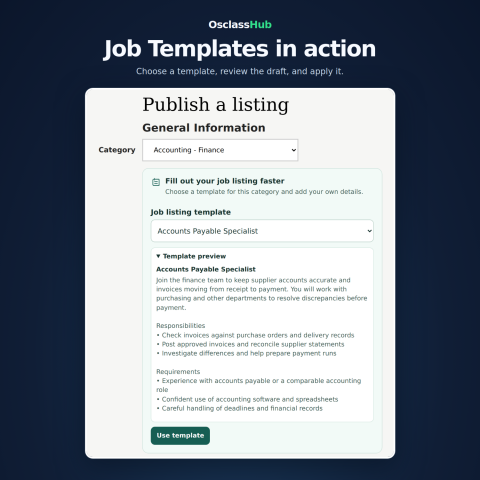
OsclassHub Job Templates adds a template picker to the Osclass listing form. When an employer selects a category with active templates, they can preview a relevant draft and insert its title, description, responsibilities and requirements. They can then edit the text and add details such as location, hours, pay and application instructions before publishing.
Use it on a dedicated job board or in the Jobs section of a classifieds site. For example, an employer posting in Accounting & Finance can start with a draft for an Accounts Payable Specialist and tailor the responsibilities to the actual opening.
How it works
- Set up your catalog. Select the Jobs root category in the admin area, import the included examples or create your own templates.
- Let employers choose a draft. The posting form shows templates for the selected category and prioritizes the current language. Employers can preview a draft before applying it.
- Publish an individual listing. Applying a template fills the supported title and description fields. If text is already present, employers can fill only empty fields or confirm that they want to replace the existing text.
What’s included
- 84 editable example drafts across 21 standard Jobs subcategories, with versions in English, German, Russian and Polish. The importer also provides editable outlines for unmatched subcategories under the selected Jobs root.
- Your own template catalog. Create, edit, enable or disable templates and control their display order. Filter the admin list by category and language.
- Language-aware selection. Assign a language to each template or make it available in any language. The interface follows the selected Osclass language. If the current language has no templates, the form prefers English. Templates marked for any language are always eligible in their assigned category.
- Preview and overwrite controls. Employers see the content before inserting it. The plugin works with standard text fields and TinyMCE.
- One admin menu entry. Open OsclassHub Market → Job Templates when the dedicated Market section is available, or Plugins → Job Templates otherwise. The Documentation tab includes the theme integration instructions.
Requirements and setup
- Osclass 8.0.0 or later and PHP 8.0 or later with mbstring. Use a PHP version supported by your Osclass release.
- A listing form with the standard Osclass category field (
catId). Custom themes may need the documented hook placement and must expose supported title and description fields. - Upload the ZIP under Plugins → Add plugin, install it, then open Job Templates to import the catalog or create your own drafts.
v1.0.0
Latest
Released: 2026-11-09
Osclass: 8.0 - 8.4 PHP: 7.4 - 8.3
No reviews found!
No comments found for this product. Be the first to comment!